
AI Gateway - AI Cost Control for Coding Agents, Tools and Subscriptions
The innFactory AI Gateway is the central governance and FinOps layer for artificial intelligence: one API for all providers, budgets for cost centers, users and keys, and a companion that measures the agent time of Claude Code, Codex and OpenCode - even when those tools run on a subscription. GDPR-compliant, runs in your cloud, built in Germany.
Available now: in production with first customers since August 2026 (version 1.0) | Standalone or integrated into CompanyGPT | All prices excl. VAT
What is the AI Gateway?
Development teams and AI agents use many providers in parallel today - each with its own key, billing and tracking. Add coding agents on subscriptions whose work never shows up on any invoice. The result: fragmented costs, budget overruns and no governance. The innFactory AI Gateway sits as a central proxy between your tools and all AI providers and, with the companion, measures what happens beside it. One URL, one key, full control - and every token is transparently attributed.
The problem: ungoverned AI sprawl in larger enterprises
The more teams, tools and agents use AI, the faster you lose oversight, control and budget.
Key sprawl & shadow AI
API keys live scattered across .env files, scripts and CI pipelines. Nobody knows who uses which provider - and every leaked key is a security and cost risk.
Costs with no attribution
At month's end a lump-sum bill arrives from OpenAI, Anthropic & Google. Which team, project or customer caused it? No one can answer cleanly.
No governance, compliance risk
Which models may who use? Is GDPR respected? Is there an audit log? Without a central layer this stays open - a real risk under the EU AI Act.
Agents on subscriptions stay invisible
Coding agents work on repositories for hours, often on a subscription that never shows up on an API invoice. Without measurement you know neither which project consumes the time nor what it would be worth at list price.
That's exactly what the AI Gateway is for - a central layer that every AI request flows through, and a companion that measures what happens beside it.
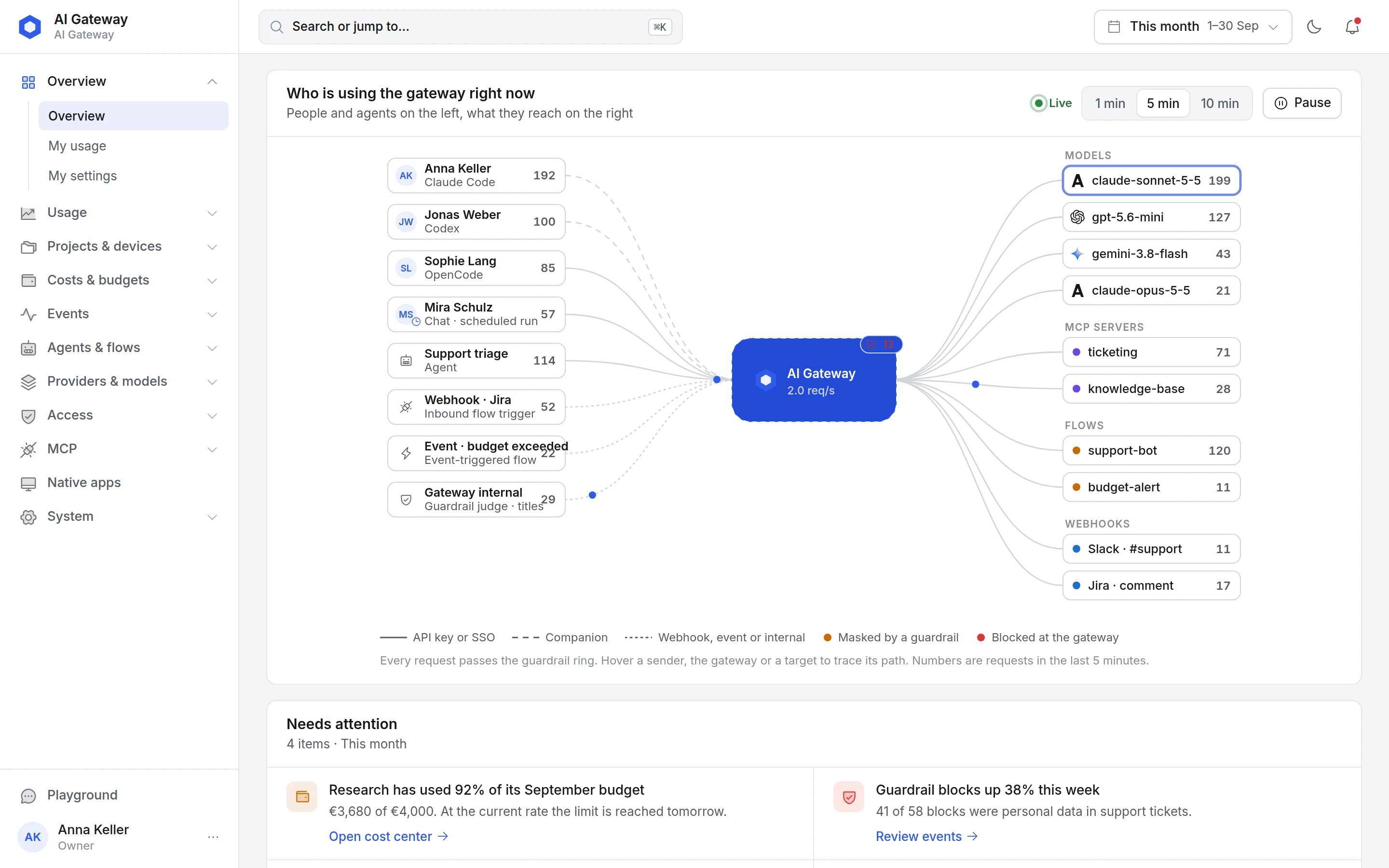
How your data flows through the gateway
The gateway is your central enterprise security and governance layer for AI: users, agents and coding tools speak one OpenAI-compatible API. The gateway authenticates, budgets, applies guardrails, logs — and routes to the right model.
Why your own AI Gateway?
Cost control, governance and speed - without vendor lock-in
AI FinOps
Every request is captured, priced and attributed to a cost center. Finally know which team, user, repository and agent drives which AI cost - in euro, at the ECB daily rate.
Budgets that actually stop
Limits for organization, cost center, user and API key apply independently. When one is exhausted, the gateway answers with 402 or routes to a cheaper fallback model - your choice.
Multi-provider, three dialects
Thirteen provider types behind one API in the OpenAI, Anthropic or Gemini dialect - including Vertex AI on the EU endpoint. Switch models via alias without reconfiguring your tools or agents.
Enterprise security layer
Policy-based guardrails inspect requests and responses, roles and permissions come from Microsoft Entra ID or Keycloak, provider credentials are AES-256-GCM encrypted with rotatable keys, and every activity lands in the audit log.
Sovereign & GDPR-compliant
Run in your cloud or in German sovereign data centers (STACKIT) with PostgreSQL. Your prompts and data stay under your control - EU AI Act included.
Lean and fast in operation
The gateway is a single binary in a container, with no runtime. Budget and rate-limit checks run in memory instead of the database and the proxy path stays lean: your tools and agents don't notice the gateway.
Two operating modes: proxy mode and companion mode
The gateway controls what flows through it. The companion measures what coding agents deliver beside it - subscriptions included.
Every request flows through the gateway
Tools and agents talk to the gateway in their native dialect: OpenAI (chat completions, responses), Anthropic (messages) or Gemini. The gateway checks budget, permissions and guardrails, picks provider and model, bills every token and writes the audit log.
- Ready-made setups for Claude Code, Codex, OpenCode, Cowork, VS Code Continue and GitHub Copilot
- Short-lived proxy tokens per device instead of static keys in config files
- Claude via AWS Bedrock or Google Vertex AI if you prefer - including prompt caching and thinking
- Model discovery for Claude Code: the gateway feeds the approved models into the tool's picker
Measure agent time, subscriptions included
The companion aigw is a small background service on the developer's machine. It reads the local session logs of Claude Code, Codex and OpenCode and reports agent time, LLM time and token classes to the gateway - even when the tool runs on a subscription and never sends a gateway request.
- Agent time (the agent's active working time) and LLM time (duration of model calls) reported separately
- Companion tokens from subscriptions valued at list price, never billed or budgeted
- Projects and repositories with cost-center rules by repository, organization or host
- Data-minimal: fixed allow-list, no prompts, no absolute paths, no credentials in remote URLs -
aigw doctor --show-payloadshows every upload - Rollout: device-code login, enrollment tokens for Intune and MDM, tray app for macOS and Windows
Companion tokens come from subscription sessions that never passed the gateway. They are valued at list price (≈) but never billed or budgeted.
Both modes in one command
aigw run launches Claude Code, Codex or OpenCode with a short-lived proxy token of the current context. The tool's own configuration stays untouched: Claude Code gets a temporary settings file, Codex its own profile, OpenCode its configuration via the environment. Agent-time measurement runs at the same time.
aigw login --base-url https://gateway.example.com
aigw daemon install
aigw setup apply <setup-id>
aigw run claude --setup <setup-id>
aigw run codex
aigw run opencode
One gateway in front of all coding tools and agent harnesses
Put agent harnesses such as Claude Code, Codex and OpenCode behind the gateway - centrally controlled, budgeted and assigned to a cost center. Ready-made setups are maintained by the admin as templates and cloned by every developer with their own key.
Claude Code
Proxy + companionAnthropic's coding harness. Native messages API, model discovery, role slots (main, background, opus, sonnet, haiku) mapped to gateway models, agent time via the companion.
Codex
Proxy + companionOpenAI Codex CLI via the Responses API. Own gateway profile in the Codex configuration, agent time via the companion.
OpenCode
Proxy + companionTerminal coding agent. Providers, models and agents in a generated opencode.json, agent time via the companion.
Cowork · Claude Desktop
ProxyManaged profile for macOS and Windows sets gateway address and auth scheme. Claude Desktop additionally as an MCP client for natural-language configuration.
VS Code · Continue & Copilot
ProxyContinue.dev with chat, edit, apply and autocomplete roles; GitHub Copilot with custom (BYOK) models and API type per model.
Pi, Gemini CLI & more
OpenAI-compatibleAny harness that accepts a custom base URL in the OpenAI, Anthropic or Gemini dialect runs through the gateway - without a ready-made setup and without agent-time measurement. Overview of all harnesses.
Plus LibreChat and CompanyGPT via trusted-header auth, MCP server registry and the primer AI harness explained.
AI FinOps: cost centers, budgets and roles
Token FinOps in practice: attribute AI costs to where they arise - down to the individual customer, repository and person
POST /v1/chat/completions
Authorization: Bearer aig_••••••••
X-Cost-Center: (pick and send)
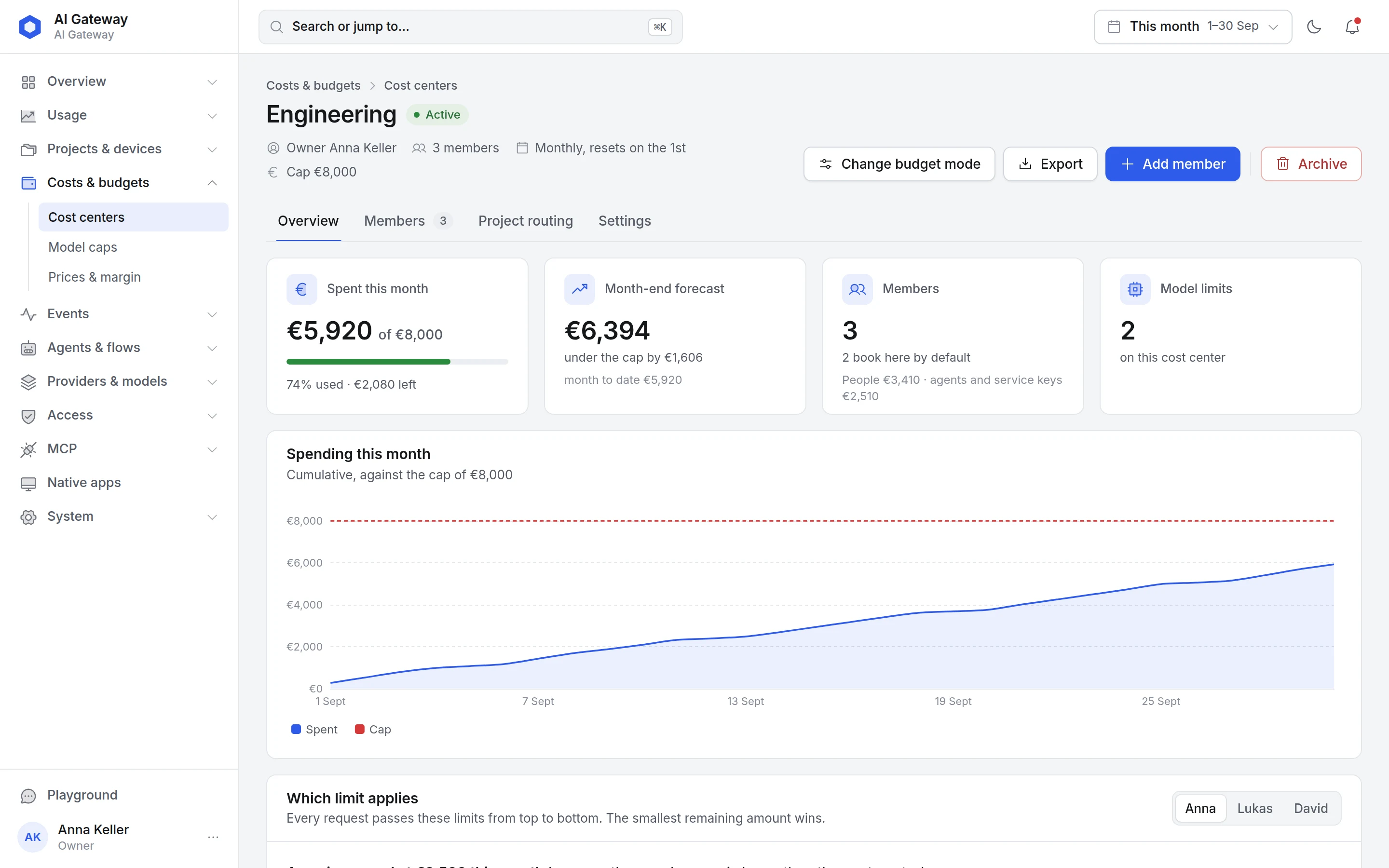
Every response carries budget headers for organization, cost center, member and key - values in microdollars, displayed in euro in the dashboard. When a limit is exhausted the gateway answers with 402 or routes to the configured fallback model; the header then names the gate that would otherwise have rejected. Per-member caps are always hard stops.
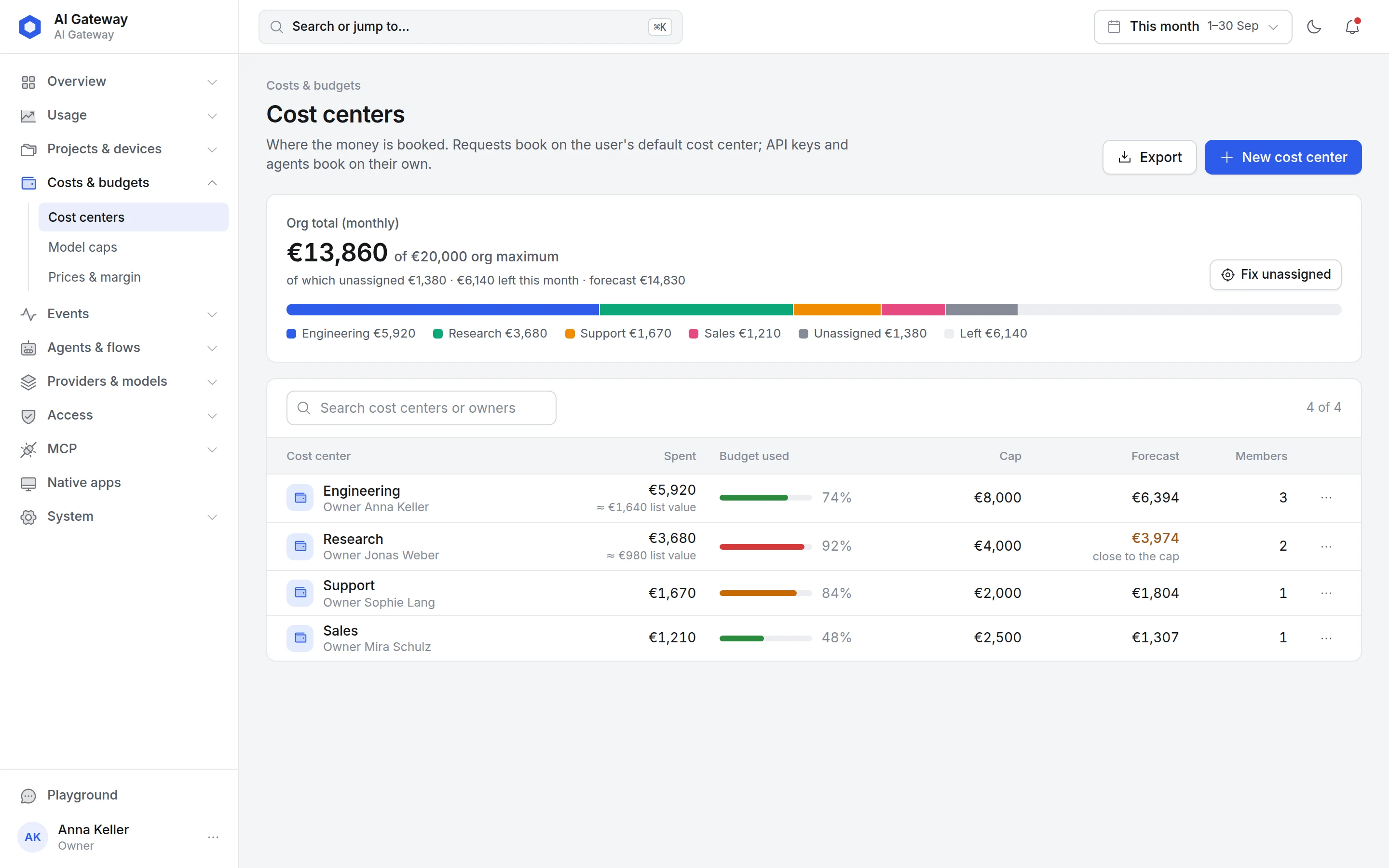
Cost centers: where the money is booked
One page shows how much of the organization budget is already used, how it splits across departments, projects and customers, and what is still unassigned. Every cost center carries spend, budget used, cap, month-end forecast and members.
- Default cost center per user, separate booking for API keys and agents
- Month-end forecast and a warning when a cap comes within reach
- Unassigned costs fixed in one click
- List value of subscription usage shown separately, never billed
Cost centers, not guesswork
Create cost centers for departments, projects or customers - in pool mode with a shared limit or in per-user mode with a cap per member. Monthly, weekly and daily windows, per-model caps and sub-limits stop further usage automatically.
Tool setups and repository rules
Developers clone a tool setup with their own key that books directly onto a cost center. Agent time from the companion is attributed via rules by repository, organization or host - AI FinOps without manual bookkeeping.
User scoping via your identity provider
Users authenticate via Microsoft Entra ID, Keycloak or another OIDC provider and are scoped granularly: allowed models, budgets and rate limits per person. Guest accounts outside your domains get no proxy access.
Seven roles for finance, audit and security
Owner, admin, auditor, finance, security, member and guest each see only their area: finance the costs and margins, auditor everything read-only, security the guardrails and events. Cost centers have their own administrators, roles come from your identity provider's groups.
Budgets that apply independently
Every limit checks on its own - the gateway blocks or reroutes before it gets expensive
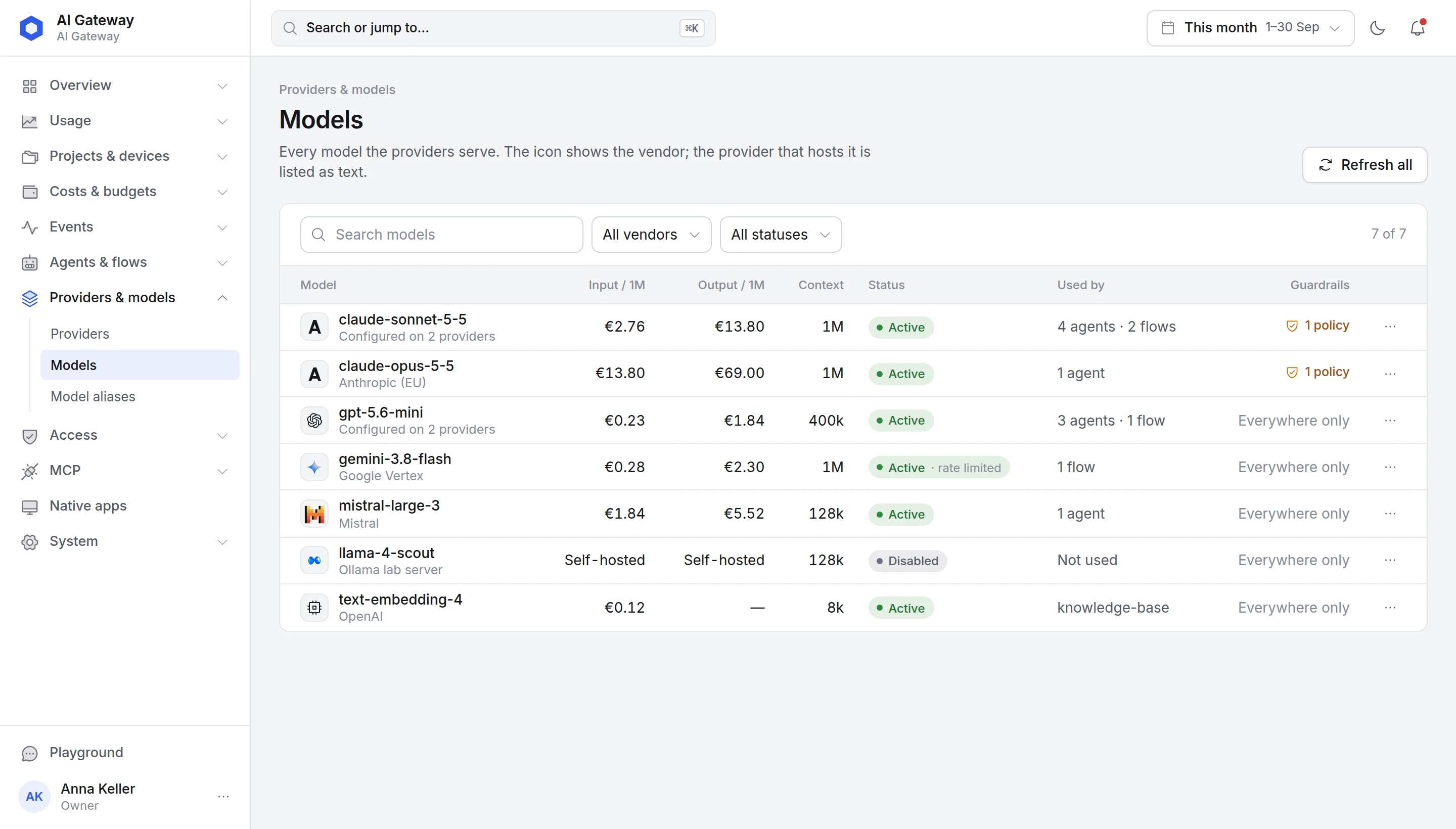
Transparent pricing - in euro, with review
Models are auto-fetched from your providers. Token prices come from our European pricing catalog ai-prices.eu, are reviewed by an admin before they apply and can be overridden individually at any time.
- Input, cache and output prices per million tokens - visible per model
- Real costs in euro at the ECB daily rate, tracked internally in US dollars
- Unpriced models by your rule: allow, bill at floor or reject
- Custom markups and customer prices with margin - for re-billing
Flow builder: chain models, guardrails and webhooks
Build flows right on top of the gateway - no extra infrastructure, same cost centers and budgets
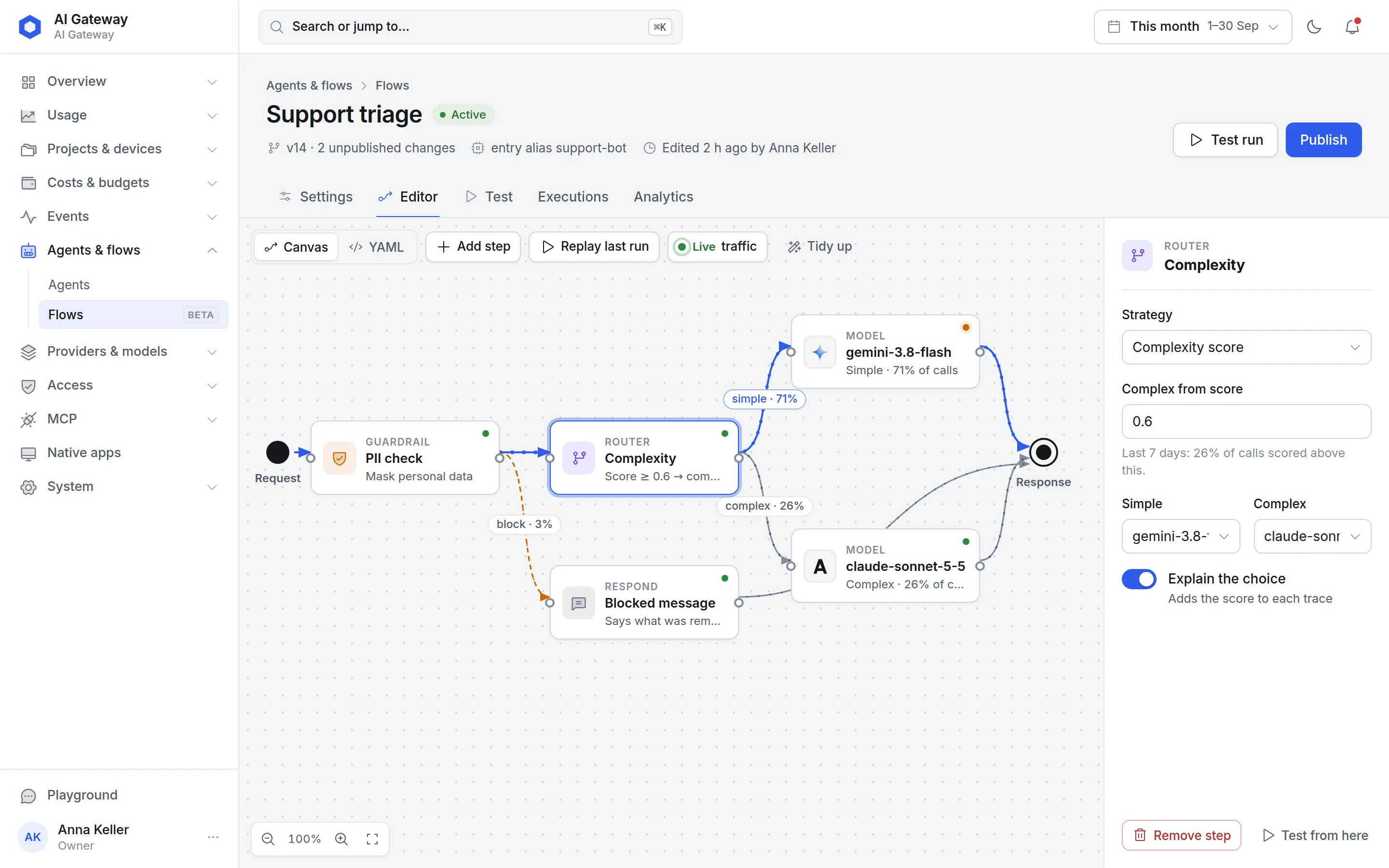
The editor inside the gateway
Nodes on the canvas, settings in the side panel, live shares on every edge: the editor shows which share of requests takes which path and, on request, explains every routing decision in the trace.
- Canvas or YAML, versions with unpublished changes
- Test run and replay of the last run straight from the editor
- Live traffic on the edges, executions and analytics per flow
Nine routing strategies
Failover, weighted, least cost, least latency, capability match, complexity, cost cascade, LLM decision and tenant scope - selectable per node, with cross-provider fallback.
Guardrails as routers
A guardrail node inspects content and branches by verdict - pass, block or fail - each to its own path; redaction happens on the pass path. Event triggers such as an exceeded budget start flows and call webhooks.
Callable like a model
A flow gets a name and is addressed by tools like any model. Templates, dry run, undo, a touch-capable canvas on tablets and a YAML editor on phones.
More than an LLM proxy
The gateway governs not only model calls, but also tool access, voice and its own configuration
MCP proxy with audit
Your agents' MCP servers flow through the same layer: eight auth modes from client credentials to per-user OAuth login, named toolsets as an access layer, guardrails on tool arguments and results. Every tool call becomes auditable - who used which tool when.
Configuration in natural language
The built-in gateway-config MCP server exposes 48 tools that let Claude Desktop, Claude Code or any MCP client manage the gateway: create cost centers, set budgets, enable models. Destructive changes require a second confirmation.
Guardrails with shadow mode
Nine rule types - from secret and PII detection via prompt injection to denied topics and external checkers - redact even mid-stream. New policies first run in shadow mode and only block once you approve. A GDPR preset is built in.
New models without client changes
The adapters recognize model family and version instead of fixed lists and absorb model-specific API breaks - such as the forced tool choice rejected by Claude Fable 5.1 or the minimal thinking level removed in Gemini 3.7+. Your tools don't need to change.
Auto-router by prompt complexity
An auto model scores every prompt and picks the matching tier (simple, medium, complex, reasoning) - only from the models the user is allowed to use per access group. Plus aliases, cross-provider fallbacks, an optional response cache and the x-aigateway-response-cost header on buffered responses.
Realtime & voice
OpenAI Realtime, Azure OpenAI, Gemini Live (also via the Vertex EU endpoint) and ElevenLabs run through /v1/realtime; text-to-speech and transcription via the audio endpoints. Realtime sessions are billed by audio and text tokens per modality, transcription per second, TTS per character.
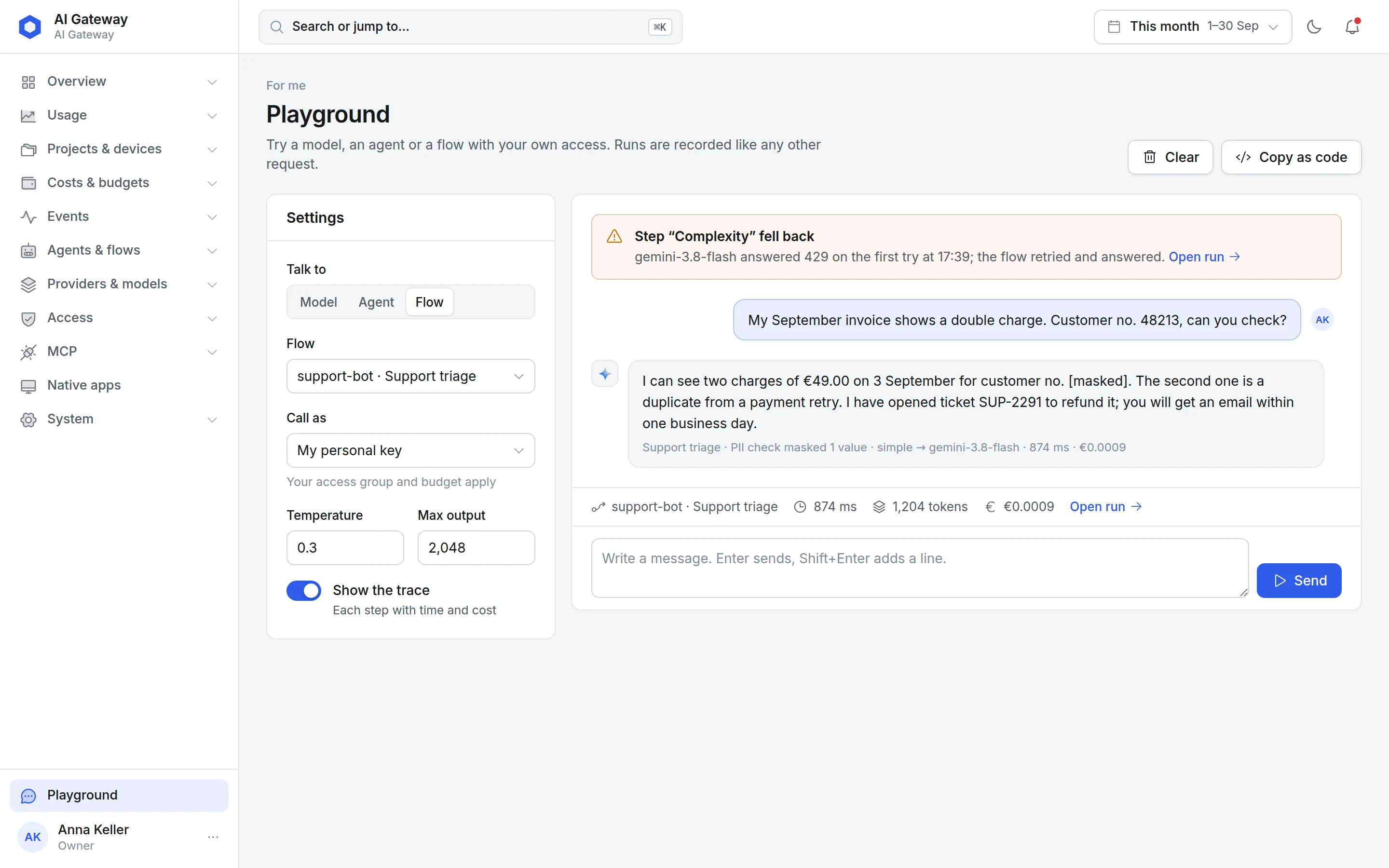
Built-in Playground - test instantly
Try any model, alias, flow and MCP tool right inside the gateway - with a concrete API key, so permissions, budget and cost center apply exactly as in production.
- Chat, TTS and realtime mode in one interface, image generation as a basic mode
- List and call MCP tools, set system prompt and parameters live
- Export as
cURLand drop it straight into your app
Your gateway in your brand
Name, logo and one colour are enough: the gateway derives the whole interface from them, from the sign-in page to the chart colours
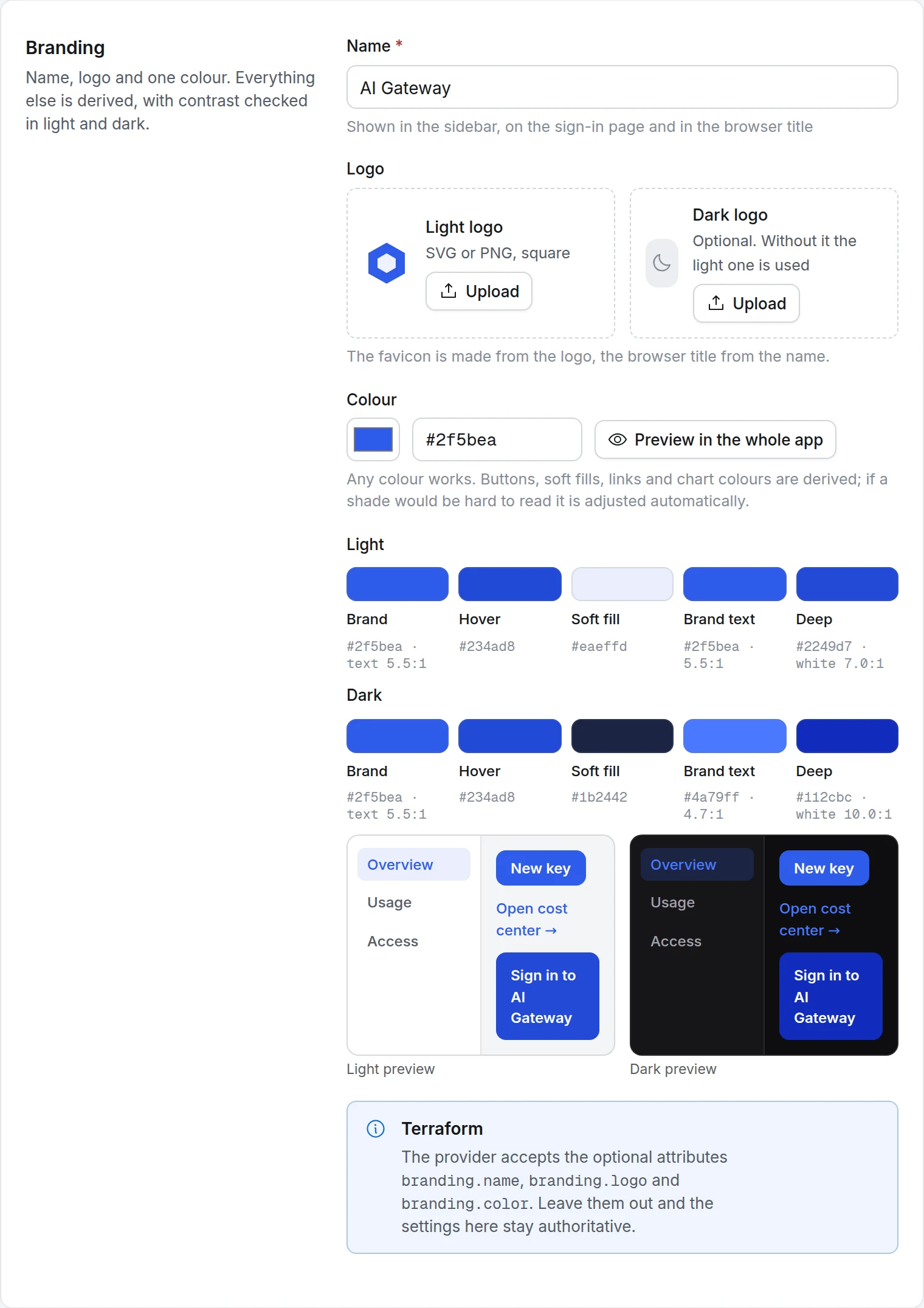
Branding in the settings, not in code
Enter your company name, a logo (light, optionally dark) and one brand colour. Buttons, fills, links and chart colours are derived from it; contrast is checked for light and dark mode and adjusted automatically if a shade would be hard to read.
- Name in the sidebar, on the sign-in page and in the browser title, favicon from the logo
- Derived palette with contrast ratios and a preview for light and dark
- Preview across the whole interface before saving, reset to the default at any time
- Also via Terraform:
branding.name,branding.logo,branding.color
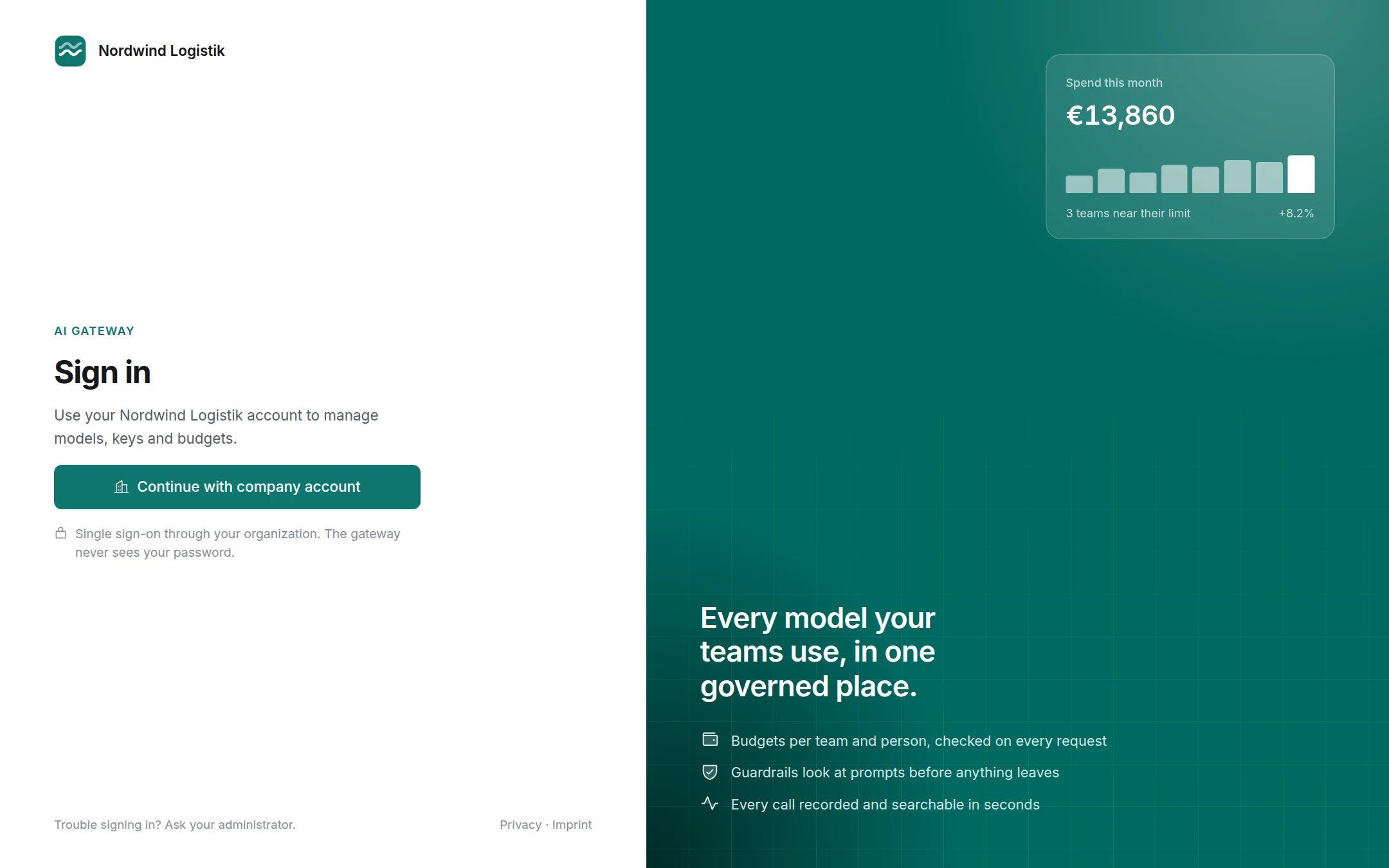
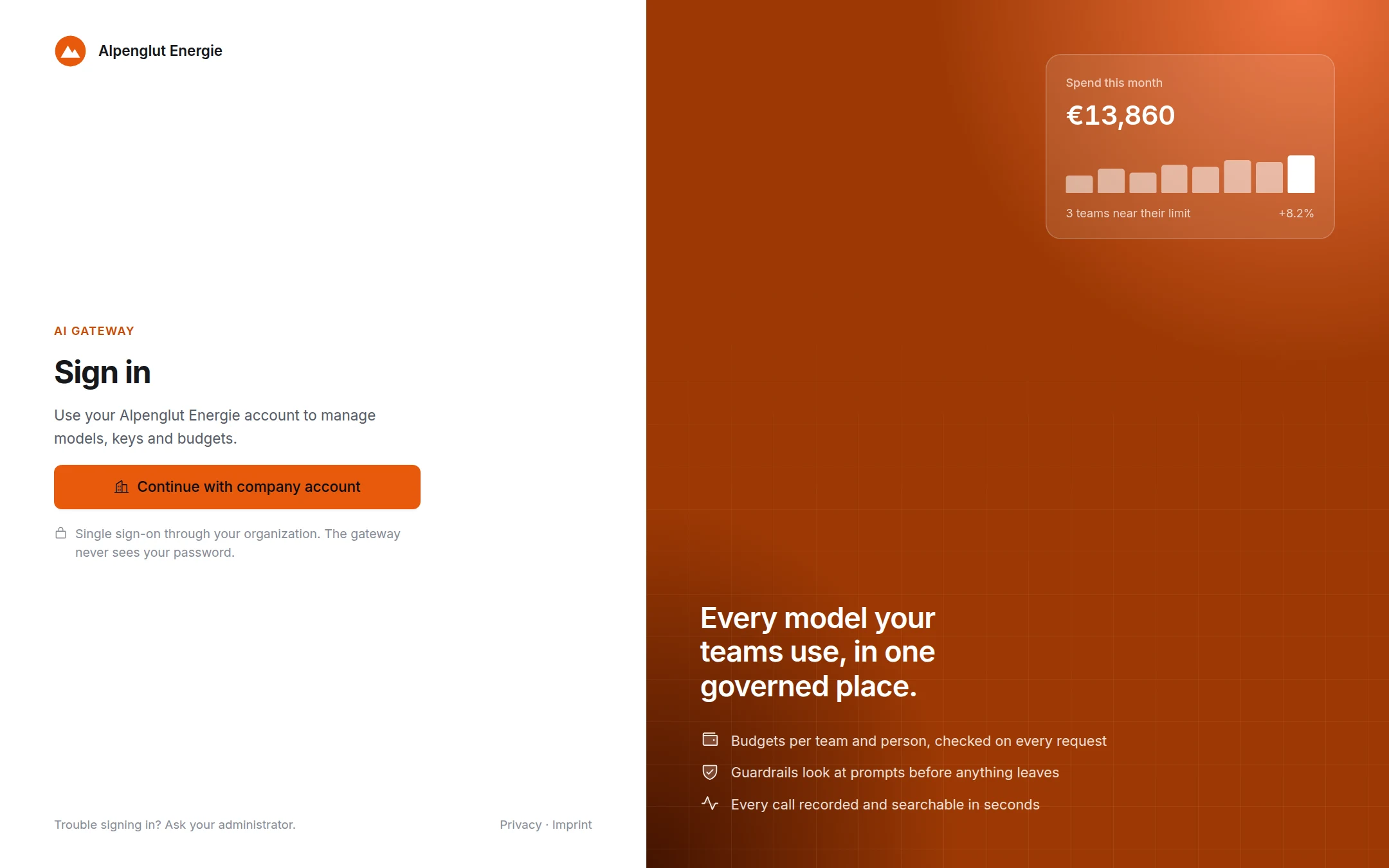
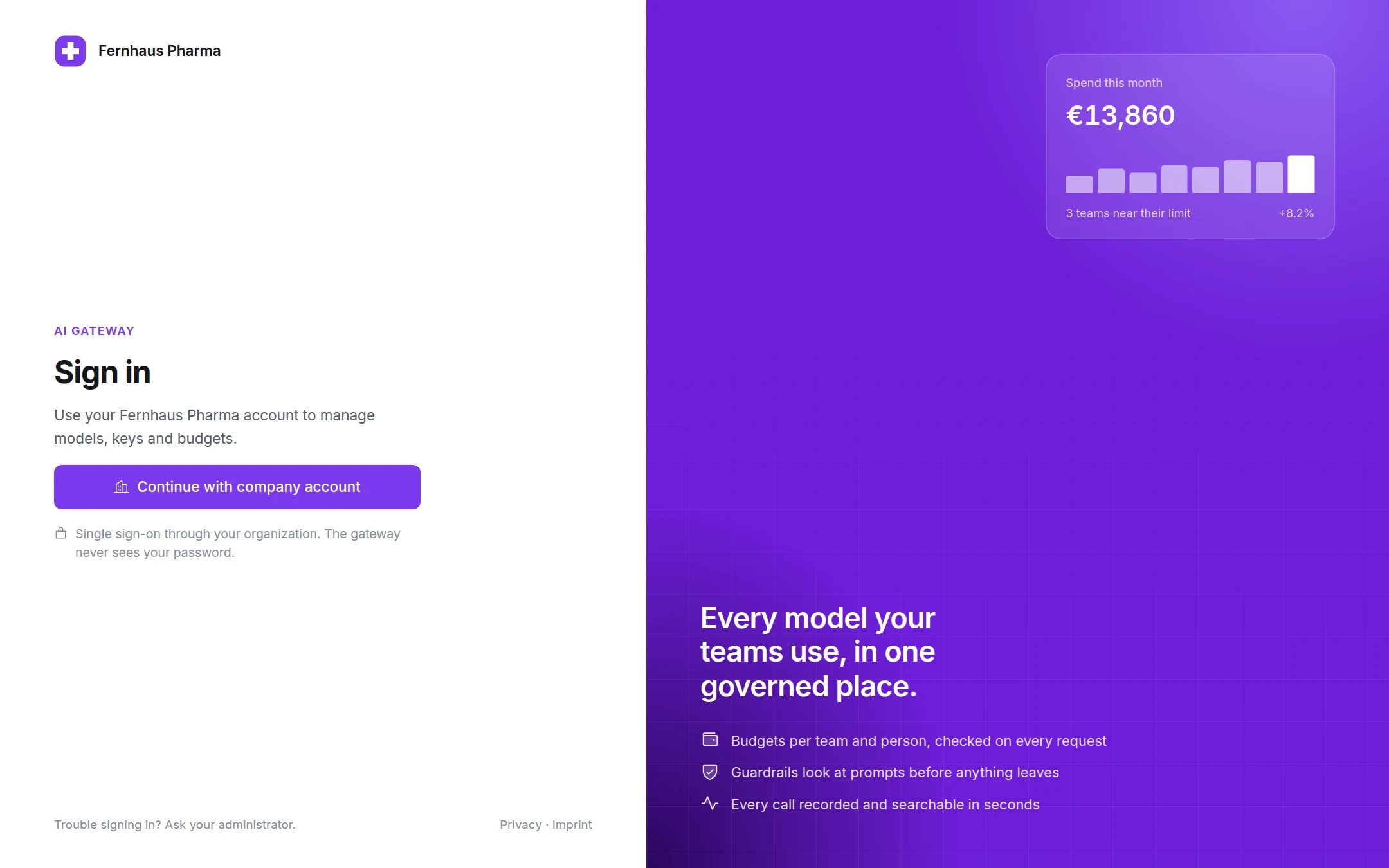
The same sign-in page, three fictional sample tenants: one colour styles sign-in, navigation, buttons and charts. Sign-in runs via single sign-on through your company account; the gateway never sees a password.
Deployment & integration
Standalone or natively in CompanyGPT - run as a container in any cloud
Standalone product
Use the AI Gateway as the central hub for all AI access of your engineering teams, CI/CD pipelines and agents - entirely without CompanyGPT. One URL, one key, full FinOps transparency.
Natively integrated into CompanyGPT
The gateway is natively integrated into our CompanyGPT: customers who use both work with it seamlessly - the same budgets, cost centers and guardrails for chat, agents and add-ons.
Runs anywhere - simply as a container
You're not locked to a vendor: the gateway runs as a Docker container in your own environment, configured via YAML, Terraform provider or natural language.
Container (Docker)
A lean backend image (one Rust binary) plus a dashboard image, with Prometheus metrics and health endpoints - quickly rolled out, scaled to several replicas with Redis and runnable anywhere containers run.
Database
Stores configuration and usage data in PostgreSQL, MongoDB or Azure Cosmos DB - you choose what fits your cloud. PostgreSQL is the sovereign path, for example with STACKIT PostgreSQL Flex.
Identity / SSO
Connects to your identity provider: Microsoft Entra ID, Keycloak or AWS Cognito via OIDC - role-based, with group mapping for six roles; guest is assigned automatically to logins outside your domains.
Any cloud
Runs as a container anywhere - reference paths for Microsoft Azure (Container Apps, AKS) and STACKIT, other clouds via Kubernetes. In the region of your choice, also GDPR-compliant and sovereign in Germany.
We help with the rollout in your cloud
Together with innFactory GmbH - an official Microsoft Cloud Solution Provider (CSP) - we set up the gateway in your environment. No cloud account of your own? We provide the matching Azure subscription for your company - including billing, support and optional maintenance.
License pricing
Monthly license, tiered by user count - runs in your infrastructure, token costs directly with your providers
10% discount on the license when you source your AI models via innFactory GmbH's reselling | All prices excl. VAT
AI Gateway compared: proxy, marketplace or governance layer?
Many tools handle routing and model access. What matters in the enterprise is the control, governance and FinOps layer on top - exactly where the AI Gateway comes in.
| What matters in the enterprise | Typical proxy or marketplace | innFactory AI Gateway |
|---|---|---|
| Measure coding agents' agent time - including subscription usage that never passes the proxy | only what passes the proxy | ✓ companion on the developer's machine |
| One control point in front of all AI tools - Claude Code, Codex, OpenCode, Cowork, VS Code & your own apps | wire up per tool yourself | ✓ ready-made setups, one command |
| Bill costs per customer, project & cost center in euro and re-bill them | mostly in US dollars, no margin | ✓ cost centers, customer prices, ECB rate |
| Access & identity per employee (SSO, role-based, seven roles) | depends on product and tier | ✓ Entra ID / Keycloak / OIDC in every license |
| Flows without extra infrastructure - chain models, guardrails and webhooks | routing rules, external workflow tools | ✓ flow builder inside the gateway |
| Operations, support & accountability in the EU | self-hosted / DIY or US cloud | ✓ managed from Germany + rollout |
The left column describes the category, not a single product. For context, each according to the vendor's documentation as of 26 September 2026: at LiteLLM, single sign-on from the sixth user and JWT/OIDC authentication for API requests are part of the enterprise license, free for up to five users. LiteLLM, OpenRouter, Portkey and Cloudflare AI Gateway capture requests, tokens and costs that pass through the respective gateway; a local companion for the agent time of coding agents is not described in any of the four documentations. Cloudflare AI Gateway offers a visual editor for dynamic routing with condition, model and limit nodes; guardrail and webhook nodes are not documented there. Sourced comparisons with individual vendors follow below.
Sourced comparisons with other LLM gateways
Each according to the vendor's documentation, with date and sources
Self-hosting open-source gateways
Hosted gateways and marketplaces
AI platforms with a gateway module
AI Gateway for your enterprise
What you get:
- One API in three dialects (OpenAI, Anthropic, Gemini) for thirteen provider types
- Proxy mode with ready-made setups for Claude Code, Codex, OpenCode, Cowork and VS Code
- Companion mode for agent time and LLM time - subscriptions included
- AI FinOps: cost centers, per-member caps, repository rules, Insights, CSV export
- Budgets for organization, cost center, user and key, per-model caps, TPM limits
- Flow builder, MCP proxy, guardrails with shadow mode, audit log
- Seven roles from Entra ID, Keycloak or OIDC - in every license
- Pricing in euro based on ai-prices.eu, standalone or in CompanyGPT
License the AI Gateway
per month
Tiered by user count, up to 749 EUR/month from 1,000 users.
10% discount when sourcing models via innFactory GmbH's reselling. All prices excl. VAT.
Request a demoFrequently asked questions
Everything important about proxy mode, the companion, AI FinOps and operations
What is an AI gateway?
An AI gateway is a central proxy between your applications, coding tools and AI agents and the AI providers (OpenAI, Anthropic, Google and others). It bundles all AI access behind one API in the OpenAI, Anthropic or Gemini dialect and handles authentication, routing, budgets, guardrails and cost accounting. For enterprises it is the central security, governance and FinOps layer for AI.
What is the difference between proxy mode and companion mode?
In proxy mode your tools' AI requests flow through the gateway: it checks budget and permissions, picks the provider and bills every token. In companion mode a small service (aigw) runs on the developer's machine and measures how long Claude Code, Codex and OpenCode actually work, even when those tools run on a subscription and never touch the gateway. Both modes combine: on request the companion launches the tools directly with a short-lived gateway token.
How does the gateway measure agent time and LLM time?
Agent time is the time a coding agent actively works for a person, derived from the session's events; unattended runs count in full. LLM time is the pure duration of the model calls. Both are reported separately, per repository, user, tool and cost center. The companion only reads the tools' local session logs and uploads a fixed allow-list: no prompts, no absolute paths, no credentials.
Does the gateway also capture usage on subscriptions such as Claude Max or ChatGPT?
Yes. The companion detects whether a session ran through the gateway or on the tool's subscription. Subscription usage is reported separately as companion tokens and valued for information at the list price from ai-prices.eu. It is never billed, budgeted or counted against limits, so subscription and gateway usage are never mixed in Insights.
Which coding tools can be connected?
Ready-made setups exist for Claude Code, Codex, OpenCode, Cowork (Claude Desktop) and VS Code with Continue or GitHub Copilot. The aigw run command launches Claude Code, Codex and OpenCode with a short-lived proxy token without changing the tool's own configuration. Other harnesses such as Pi or Gemini CLI use the gateway's OpenAI-compatible endpoint, but without agent-time measurement by the companion.
Does Claude Desktop work with the gateway?
Cowork, the agent in Claude Desktop, gets a managed profile for macOS (configuration profile) and Windows (registry) that sets the gateway address and the auth scheme. Claude Desktop can also connect as an MCP client: via the built-in gateway-config MCP server you configure the gateway in natural language straight from the chat. The classic Claude Desktop chat window cannot be proxied through a gateway because it does not expose a custom base URL.
When does a company need an AI gateway?
As soon as more than one team, several tools or autonomous AI agents use AI. Without a central layer you then lack cost control, attribution and governance. An AI gateway prevents shadow AI, budget overruns and compliance risks and makes AI costs traceable per team, user, agent and customer.
What does the AI Gateway cost?
The license is tiered monthly by user count: 199 EUR up to 10 users, 299 EUR up to 50, 399 EUR up to 150, 499 EUR up to 500, 599 EUR up to 1,000 and 749 EUR from 1,000 users (excl. VAT). When sourcing your AI models via innFactory GmbH reselling you get a 10% discount on the license. Token costs are billed directly by your providers.
How is it different from LiteLLM, OpenRouter, Portkey or Cloudflare AI Gateway?
LiteLLM (open-source proxy), OpenRouter (hosted model marketplace), Portkey (according to its own website positioned as the PRISMA AIRS AI Gateway by Palo Alto Networks since July 2026, as of 26 September 2026) and Cloudflare AI Gateway solve routing and model access. The innFactory AI Gateway adds the governance and FinOps layer on top: user scoping via Entra ID or Keycloak, cost centers with per-member caps, agent-time measurement via the companion including subscription usage, a flow builder, prices in euro from ai-prices.eu, run in your cloud or in German data centers. You will find balanced comparisons with dates and sources on our comparison pages.
Do I need CompanyGPT to use the gateway?
No. The AI Gateway is a standalone product for all AI access of your tools, pipelines and agents. If you already use CompanyGPT, the gateway serves as the shared cost-control layer for chat, agents and add-ons.
Which providers and models are supported?
Thirteen provider types: OpenAI, Azure OpenAI, Azure AI Foundry, Anthropic Claude (direct or via Vertex AI), Google Gemini (AI Studio or Vertex AI including the EU endpoint), Mistral, AWS Bedrock (including Bedrock Mantle), STACKIT, IONOS, Ollama, LM Studio, ElevenLabs and custom OpenAI-compatible endpoints. Models are auto-fetched, prices come from ai-prices.eu and are reviewed by an admin before they apply. New model versions are matched by model family and version rather than fixed lists.
Can the gateway route requests to the right model automatically?
Yes. An auto-router scores the complexity of each prompt and picks a tier (simple, medium, complex, reasoning) from the models the user is allowed to use per access group, never a forbidden model. On top there are aliases, cross-provider fallback models, a budget fallback model instead of a hard rejection and an optional response cache. Every routing decision is logged with its reason.
What is the flow builder?
The flow builder is a visual editor inside the gateway that chains models, guardrails, routers and webhooks into reusable flows. Strategies such as failover, least cost, least latency or cost cascade, guardrail nodes acting as content routers and event triggers (for example an exceeded budget) are built in. A flow is called like a model and books onto the same cost centers and budgets. Tablets get a touch-capable canvas, phones a YAML editor.
How do I see the cost of a single request?
Every buffered response carries the header x-aigateway-response-cost with the billed amount in USD, plus budget headers for organization, user, cost center and key. In Insights you see usage and cost per user, cost center, model, tool and repository in euro, converted at the ECB daily rate, including budget utilization and CSV export.
Does the gateway support voice and realtime models?
Yes. OpenAI Realtime, Azure OpenAI, Gemini Live (also via the Vertex EU endpoint) and ElevenLabs run via /v1/realtime; text-to-speech and transcription are served via the OpenAI-compatible audio endpoints. Realtime sessions are billed by audio and text tokens per modality, transcription per second and TTS per character, so that voice sessions count correctly against budgets.
Where is my data processed?
The gateway runs as a container in your cloud or in sovereign German data centers (STACKIT), with PostgreSQL, MongoDB or Azure Cosmos DB as the database. Prompts and data stay under your control. API keys are stored only as a hash, provider credentials are AES-256-GCM encrypted with rotatable keys. Capturing prompt content for observability is off by default.
What does AI FinOps mean in practice?
AI FinOps applies FinOps practice to AI costs: measure, attribute, budget, optimize. The FinOps Foundation describes this as FinOps for AI, with metrics such as cost per token and quotas per team. In the gateway this means cost centers in pool or per-user mode, budgets for organization, user and key, per-model caps, TPM limits and Insights that attribute every token to a team, user, repository or customer.
Can I run the AI Gateway with my own branding?
Yes. In the settings you enter your company name, a logo (light, optionally dark) and one brand colour. The gateway derives buttons, fills, links and chart colours from it and checks the contrast for light and dark mode automatically. The name appears in the sidebar, on the sign-in page and in the browser title, and the favicon is made from the logo. The same values can be set through the Terraform provider.
Are there German alternatives to the AI Gateway?
Yes, for example TokenControl by white duck from Rosenheim, which according to the vendor focuses on FinOps and governance for AI applications. The innFactory AI Gateway additionally relies on the companion for agent time, the flow builder, the MCP proxy and native integration of coding tools. Which solution fits depends on the use case; we are happy to advise you neutrally.
Ready for AI cost control?
Schedule a conversation and learn how the AI Gateway makes your AI costs transparent and controllable - for tools, agents and subscriptions.