
companyRAG – AI Search Across Your Entire Knowledge Base
Make your documents searchable for AI agents – without limits. Unlimited document count, automatic SharePoint synchronization and semantic search, available directly in CompanyGPT.
companyRAG on Video
Make company knowledge searchable – collections, integrations and agents explained in a few minutes (video in German)
What the video shows
- Create collections and index documents
- SharePoint integration with automatic synchronization
- Semantic search across all indexed knowledge
- AI agents access the content directly via the MCP server
Everything You Need
From file to AI agent – companyRAG handles your entire document infrastructure.
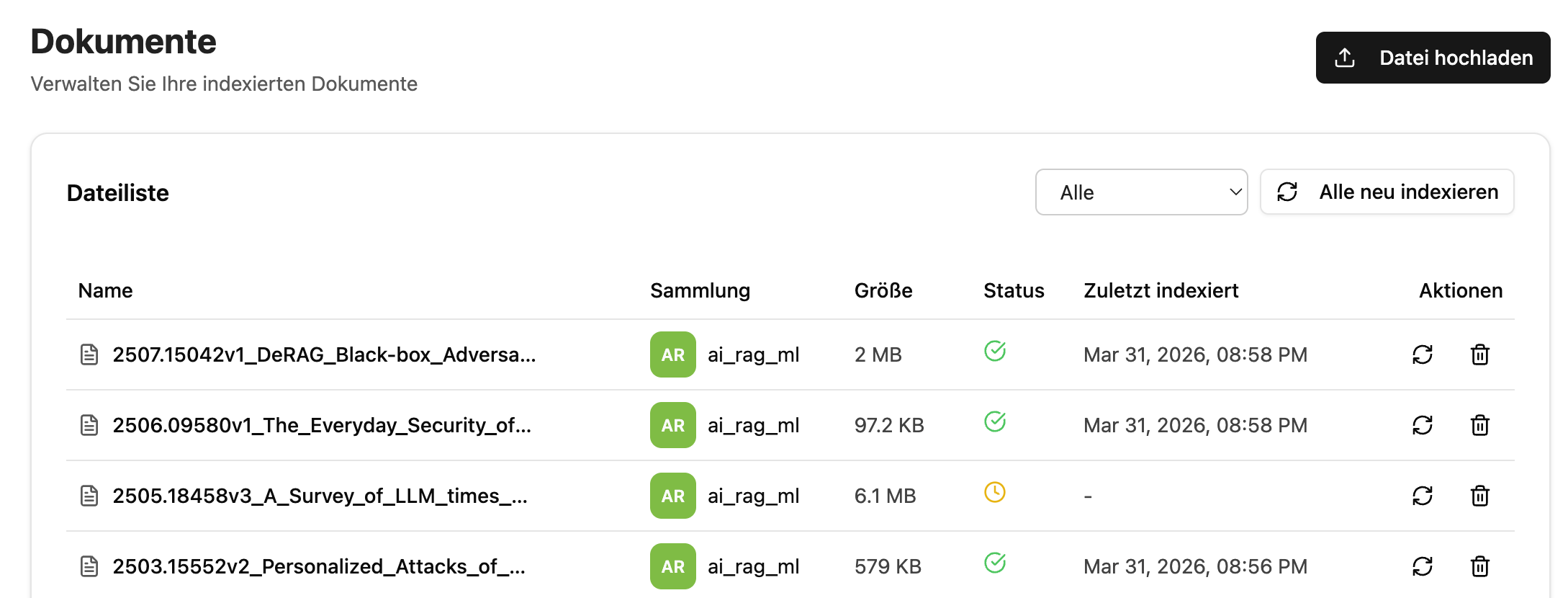
Manage Documents
All indexed files at a glance. Status, collection and timestamp always in view – re-index or delete with one click.
Collections & Permissions
Organize documents in collections and control access selectively – for individual users, teams or the entire organization.
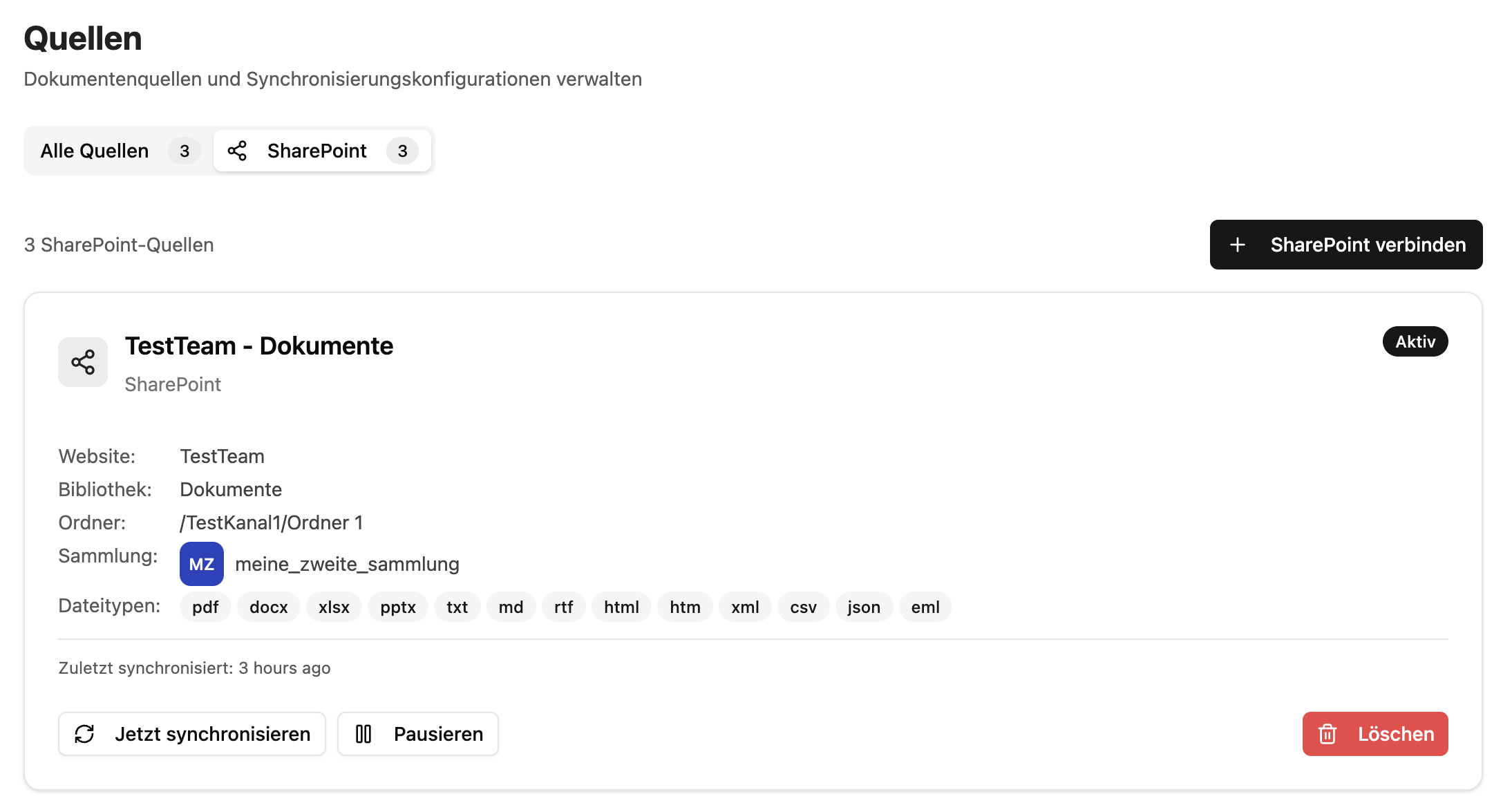
SharePoint Sync
Connect SharePoint and Teams directly. New files in the configured folder are automatically indexed – no manual effort.
Semantic Search
Via the "ai-search" MCP server, AI agents find relevant content through semantic similarity search – not just keyword matching.
Flexible Upload
Upload files directly – individually or multiple at once. 16 supported formats: PDF, DOCX, XLSX, PPTX, HTML, CSV, JSON and more.
Full Picture, Full Control
The file overview shows at a glance which documents are indexed, when they were last processed and which collection they belong to. Individual files can be re-indexed or removed directly – no detours.
Request Demo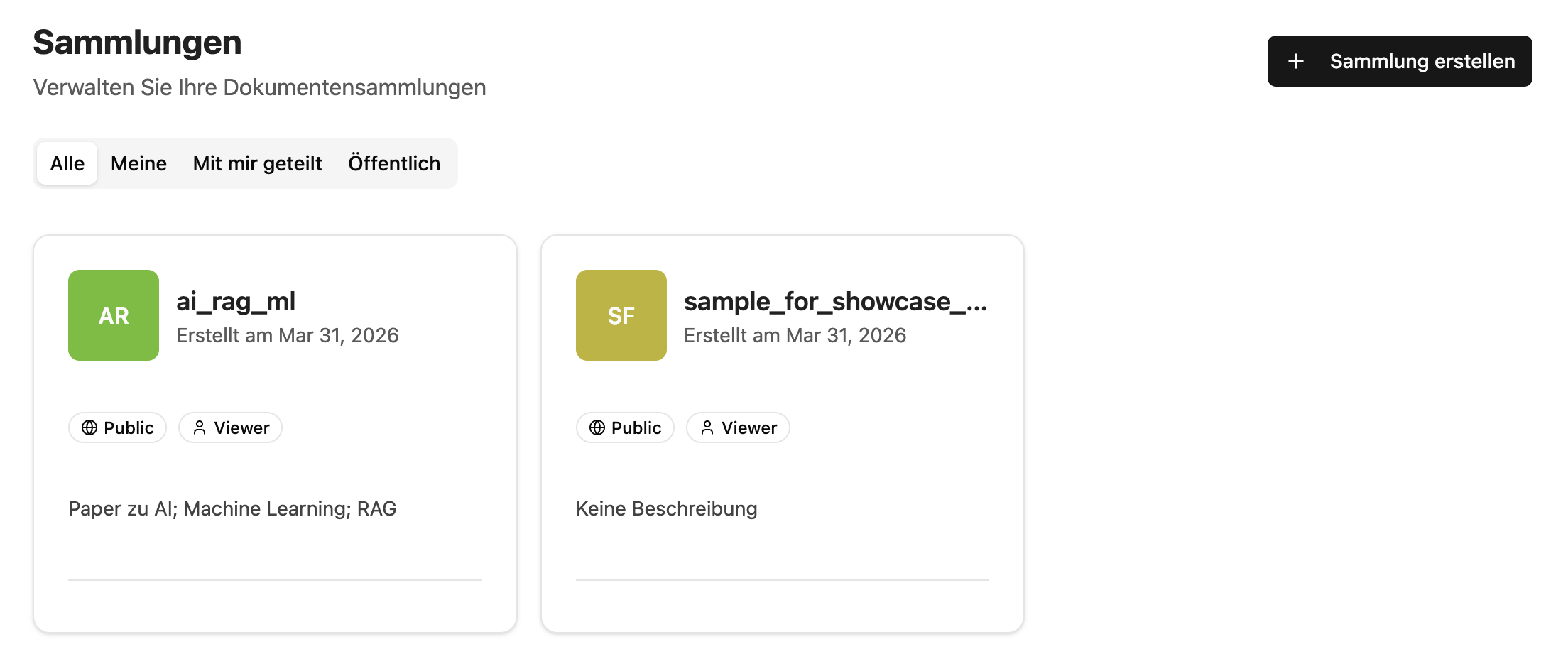
Structure Documents, Control Access
Collections let you group documents logically and assign permissions precisely – private for yourself or shared with individuals, Entra groups or the entire organization.
Teams stay organized and sensitive content stays where it belongs.
SharePoint Integration
Connect once, stay current – companyRAG automatically keeps your document base up to date.
Select website or team
Choose any SharePoint website or Microsoft Team as source.
Select library & folder
Choose the desired folder – all subfolders are automatically included.
Set target collection & done
Filter file types, choose collection – synchronization then runs fully automatically.
Ready to Use in CompanyGPT
Via the MCP server "ai-search", your agents access indexed documents directly – with three specialized search tools for every use case.
Semantic Search
Finds relevant content based on meaning – not just exact matches. The default choice for most queries.
Document Query
Retrieve all content from a specific document – ideal when users ask about a particular file.
Metadata Filter
Narrow content by structured attributes – for precise, context-aware results from large document volumes.
No Limitations
companyRAG sets no limits – neither on the number of documents nor on the length of individual files. The solution grows with your needs.
Frequently Asked Questions
What is companyRAG?
companyRAG is an add-on for CompanyGPT that allows you to make large volumes of company documents semantically searchable. Via the MCP server 'ai-search', your AI agents can directly access the indexed content.
Which document formats are supported?
companyRAG supports all common formats: PDF, DOCX, DOC, TXT, MD, RTF, HTML, XML, CSV, JSON, EML, XLSX, XLS, PPTX and PPT.
How does SharePoint integration work?
You connect your SharePoint websites, teams or libraries as document sources. companyRAG automatically synchronizes the content – new files in the configured folder are indexed without any further action.
Is there a limit on the number of documents?
No. companyRAG sets no limits on the number of documents or the length of individual files. The solution scales with your needs.
What is the MCP server 'ai-search'?
The MCP server 'ai-search' provides three search tools: search_content for semantic similarity search, find_content_by_source for document-specific queries, and find_content_by_metadata for metadata-based filtering. CompanyGPT agents can use these tools directly.
What are collections and what are they used for?
Collections are storage locations that allow you to group documents and manage access rights. They can be private (only for you) or public, and can be shared selectively with individual users, Entra groups or the entire organization.
What happens when an indexing job fails?
Failed jobs are displayed in the job overview with the status 'Failed'. Error details can be found in the 'Error' column. The job can then be retried.
What does companyRAG cost?
companyRAG is an addon for CompanyGPT and requires an active CompanyGPT maintenance contract (399 EUR/month). The maintenance contract includes updates, support and access to all addons. All prices plus VAT.
Ready to Unlock Your Knowledge Base?
Talk to us – we'll show you how companyRAG works in your environment.