
companyFILES
The central file hub for CompanyGPT. Create Word, Excel, PowerPoint and PDF documents directly from your AI conversations. Manage templates, generate visualizations and organize all AI-generated files in one place. Clear, structured and always available.
companyFILES on Video
Have the agent create Excel files, PowerPoint decks and letters – the demo in a few minutes (video in German)
What the video shows
- Have the agent create Excel files – right from the AI conversation
- Generate PowerPoint presentations from natural language
- Produce letters and Word documents based on your templates
- Manage and download all generated files centrally in companyFILES
Everything in One Place
The central file hub for your AI assistant
Document Creation
Create Word, Excel, PowerPoint and PDF files directly from CompanyGPT. Your AI converts prompts into finished documents.
Smart Templates
Store document templates (.docx, .xlsx, .pptx) and have them automatically filled with current data.
Visualizations
Create interactive charts and diagrams from raw data. Bars, lines, pies and Mermaid flowcharts via AI prompt.
File Conversion
Switch flexibly between formats: Excel ↔ CSV/JSON, Word ↔ PDF, Markdown ↔ HTML and more.
File Upload
Upload any files via drag & drop and make them available to your AI assistant.
Organization
Organize documents in folders, create ZIP archives and keep track of all files.
What can companyFILES do?
Six powerful features for your document workflows
1. Comprehensive Document Creation
Native Word (.docx), Excel (.xlsx), PowerPoint (.pptx) and PDF files can be created directly from CompanyGPT.
- Excel: Generate tables from CSV, JSON and arrays or use advanced templates including formulas
- Word: Seamlessly convert Markdown, HTML, JSON or templates into finished documents
- PowerPoint: Create presentations directly from Markdown texts or templates
- PDF: Generate PDFs directly from Markdown or HTML
2. Data Processing & Code Export
Structured data such as JSON or CSV can be converted directly into clean Excel tables or Word documents.
- JSON/CSV to Excel with automatic formatting
- Generate any text-based files and code scripts
- Generate SQL, JSON, YAML, XML, HTML files
- Python, JavaScript and other code exports
3. Visual Diagrams & Charts
Raw numbers are visualized directly as meaningful graphics, all via simple prompt.
- Interactive Charts: Bar, line, pie, scatter, bubble or radar charts
- Zoom function and image export for each chart
- Mermaid Diagrams: Flowcharts, sequence diagrams, class diagrams via prompt
- State machines and ER diagrams for technical documentation
4. File Conversion & Extraction
Switch flexibly between formats and extract data from existing documents.
- Conversion: Excel ↔ CSV/JSON, Word ↔ PDF, Markdown ↔ HTML
- Extraction: Extract data specifically from Excel, Word and PDF files
- Extract and further process text content in a structured way
- Image editing: Resize and convert formats
5. Smart Template Management
Upload custom, user-defined or global admin templates and have them automatically filled.
- Templates for Word, Excel and PowerPoint (.docx, .xlsx, .pptx)
- Dynamic replacement of placeholders with current data
- Global templates for all users or personal per scope
- Automatically fill PDF forms
6. File Management & Organization
Keep track of all generated and uploaded files.
- Structuring: Organize files clearly in folders
- Create ZIP archives for bundled download of multiple documents
- Filter by type, date and folder
- Expiry date per file for automatic cleanup
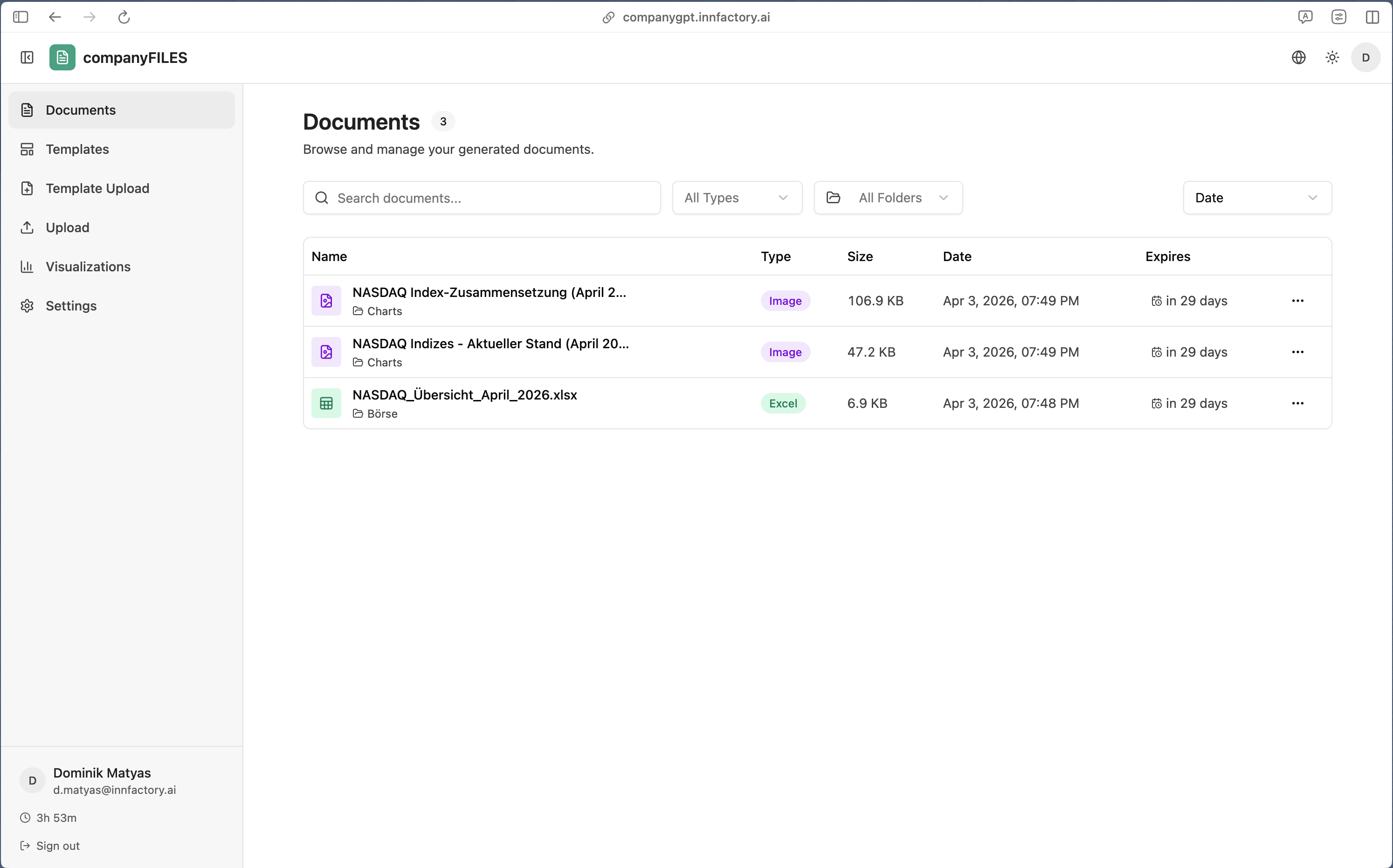
All Documents in One Place
Every file your CompanyGPT creates for you is automatically saved in companyFILES. You keep full track of all generated Word, Excel, PowerPoint and PDF documents.
- Automatic Saving: All files generated by CompanyGPT land directly in your file hub
- Smart Filters: Sort by file type, folder, creation date or expiry date
- Expiry Management: Each file shows its expiry date. Old documents are automatically cleaned up
- Quick Access: Download all files with one click or open directly in CompanyGPT
- Versioning: Keep track of different versions of your documents
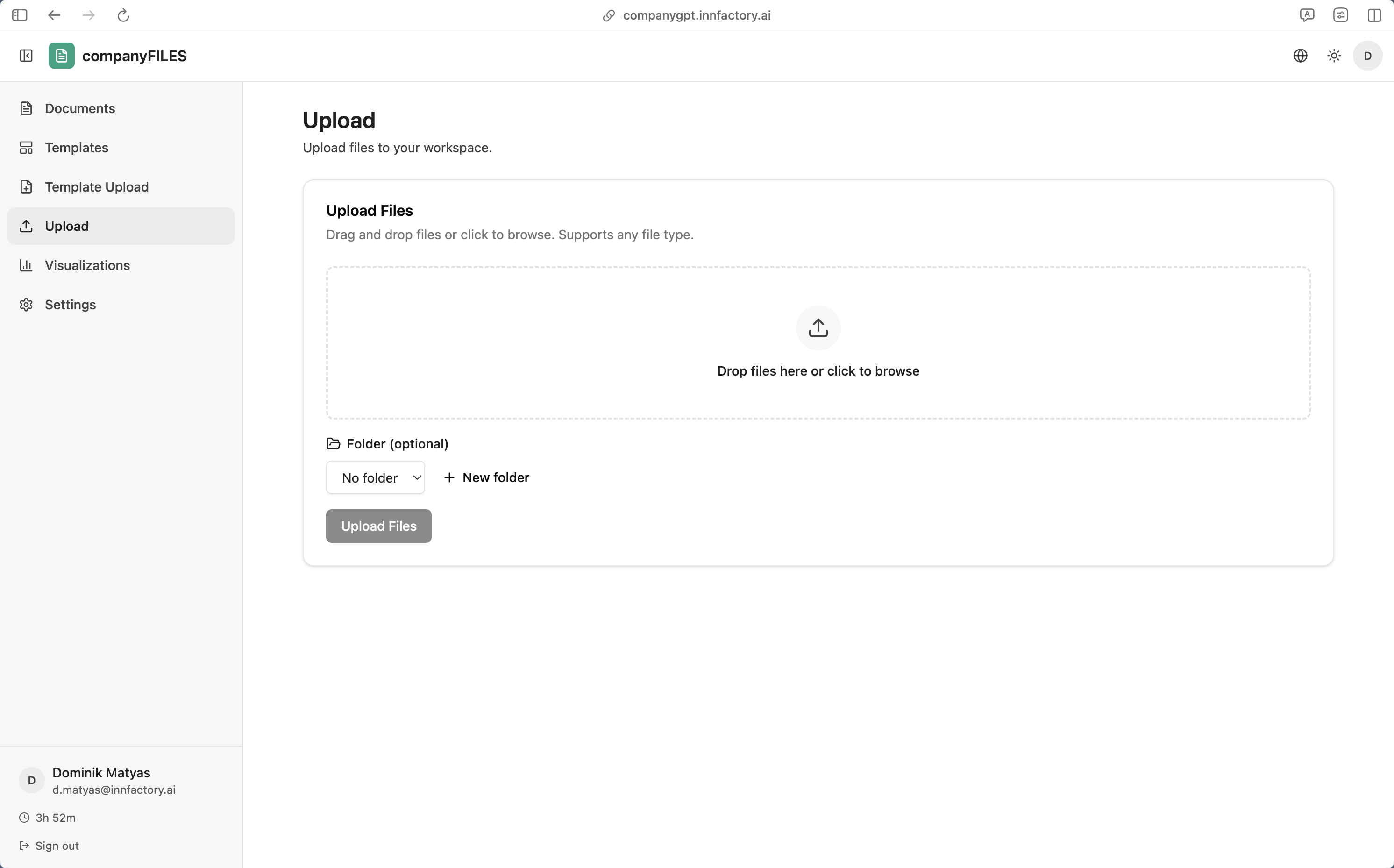
Upload & Provide Files
Upload any files directly to your companyFILES workspace and make them available to your AI assistant. Whether documents, images, PDFs or code: your CompanyGPT can analyze and process all uploaded files.
- Drag & Drop: Simply drag files into the upload area or click to browse
- All File Types: Word, Excel, PowerPoint, PDF, images, code, CSV, JSON and more
- Folder Assignment: Organize uploads directly in the appropriate folder structure
- Immediately Available: Uploaded files are immediately available to your CompanyGPT for analysis
- Batch Upload: Upload multiple files at once
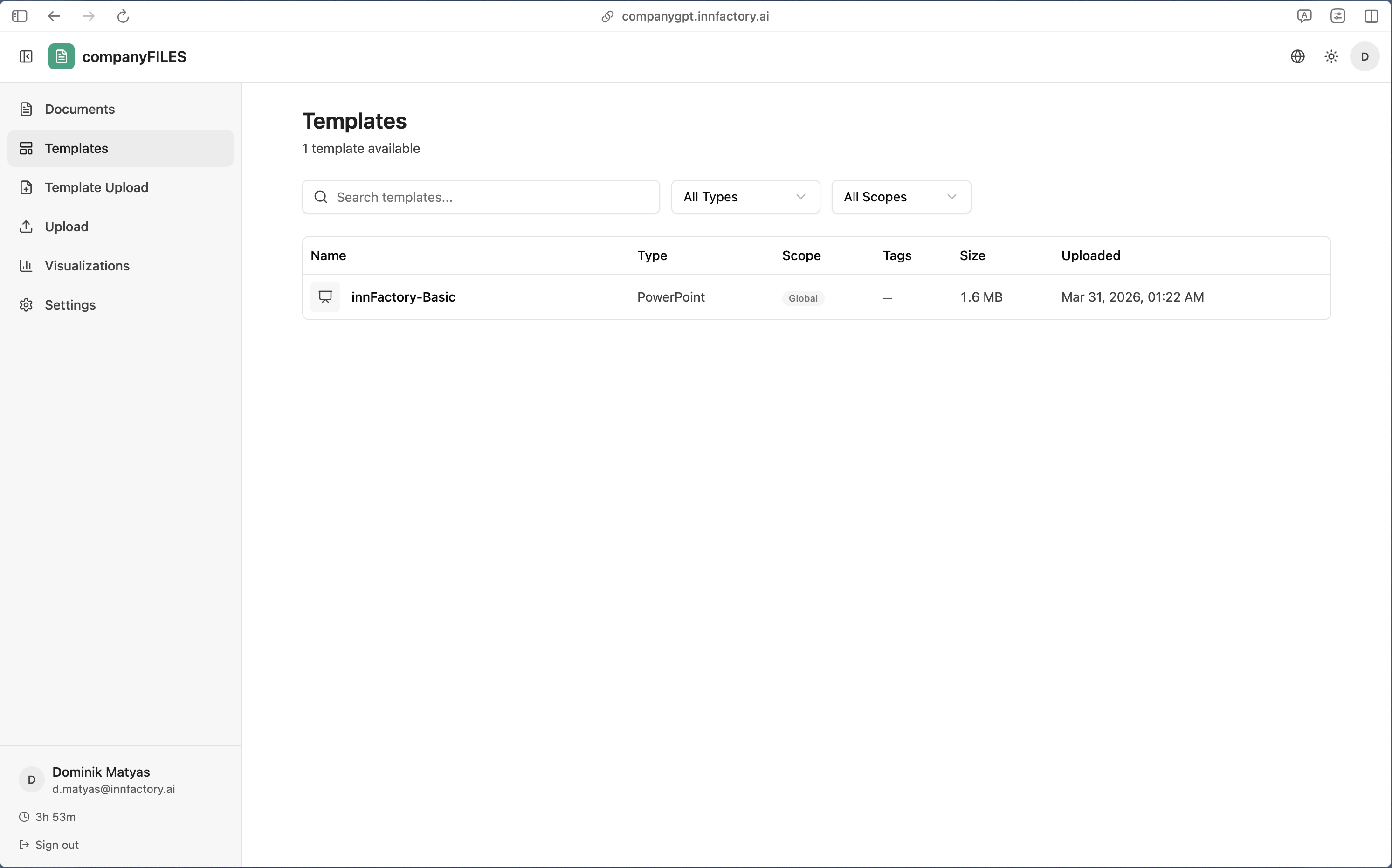
Smart Template Management
Provide your CompanyGPT with reusable document templates, globally for all users or personally for individual scopes. The AI automatically fills your templates with the right data.
- Global Templates: Admins can upload company-wide templates available to all users
- Personal Templates: Each scope can store its own specific templates for its workflows
- Dynamic Filling: Placeholders in Word, Excel or PowerPoint are automatically replaced with current data
- All Office Formats: .docx, .xlsx, .pptx and all common Microsoft Office formats are supported
- Search & Filter: Find the right template by type, scope or keywords
- Version Control: Keep track of different template versions
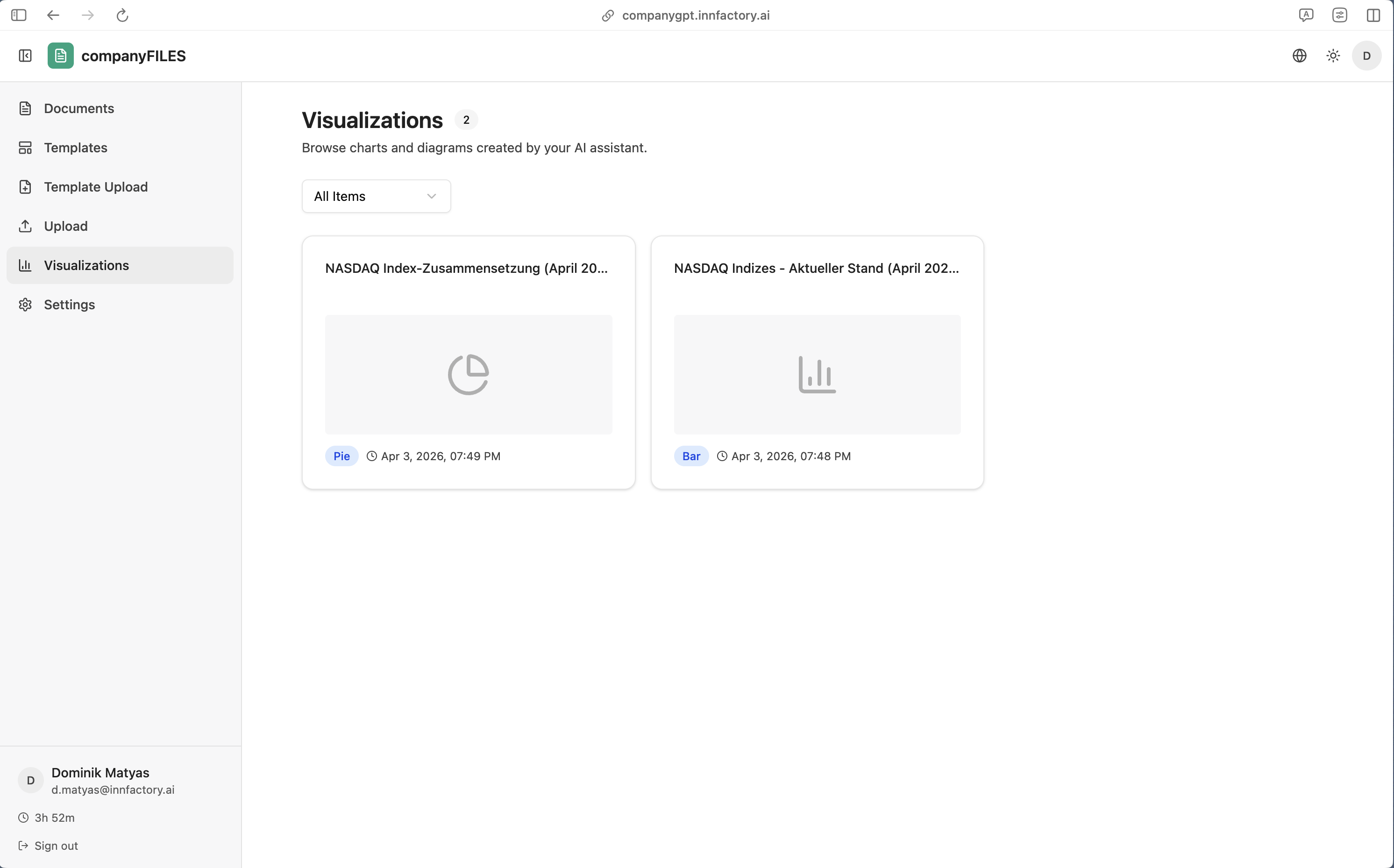
Browse AI Visualizations
All diagrams, charts and graphics generated by your AI assistant are automatically saved in companyFILES and can be retrieved at any time. Perfect for reports, presentations and analyses.
- Interactive Charts: Bar, line, pie, scatter and bubble charts with zoom function
- Mermaid Diagrams: Flowcharts, sequence diagrams, class diagrams and state machines
- Image Export: Each visualization can be exported as PNG or SVG
- Filter Function: Find charts by element type, date or chart type
- Direct Access: Open visualizations directly from CompanyGPT
- Reuse: Use saved charts in new documents and presentations
Frequently Asked Questions
Everything important about companyFILES at a glance
Which file formats can companyFILES create?
companyFILES supports the creation of Word (.docx), Excel (.xlsx), PowerPoint (.pptx), PDF, as well as all text-based formats such as JSON, CSV, YAML, XML, HTML and code files (Python, JavaScript, SQL, etc.). Additionally, interactive charts and Mermaid diagrams can be generated.
How does template management work?
You can upload your own Word, Excel or PowerPoint templates. companyFILES automatically fills them with data from your CompanyGPT conversations. Admins can provide global templates for all users, while individual scopes can store their own specific templates.
Can files be filled automatically?
Yes! You store placeholders in your templates (e.g. {{customer}}, {{date}}, {{amount}}), and CompanyGPT automatically replaces them with the current data. This works for Word documents, Excel tables and PowerPoint presentations. PDF forms can also be filled out automatically.
How large can the generated files be?
There are no fixed size limits. companyFILES can create both small documents (e.g. a 1-page protocol) as well as extensive Excel tables with thousands of rows or multi-page PowerPoint presentations. Generation takes place directly in your cloud environment.
Are all files saved automatically?
Yes, every file CompanyGPT creates for you is automatically stored in companyFILES. You can view, download or delete these files at any time. Each file receives an expiry date after which it is automatically cleaned up, keeping your file hub always tidy.
Is companyFILES included in the maintenance contract?
Yes, companyFILES is part of the optional maintenance contract for CompanyGPT. In addition to companyFILES, you also receive the Admin Dashboard, regular updates, security patches and technical support. Without a maintenance contract, you can operate CompanyGPT with your own IT team.
companyFILES as Part of the Maintenance Contract
What you get:
- companyFILES – Create and manage AI-generated documents
- companyDashboard – Full transparency on AI usage and costs
- companyRAG – Semantic search across your company documents
- companyTRANSLATE – GDPR-compliant AI translator
- companyTRANSCRIBE – Transcription, speaker diarization and automatic meeting minutes
- Regular updates and security patches
- Technical support from our team
companyFILES as Part of CompanyGPT
companyFILES is included in the optional maintenance contract for CompanyGPT. Benefit from automatic document creation, smart template management and comprehensive file management. All seamlessly integrated into your AI assistant.
- ✓ Create Word, Excel, PowerPoint & PDF from prompts
- ✓ Automatically fill templates with data
- ✓ Interactive charts & Mermaid diagrams
- ✓ Organize, convert & extract files
- ✓ Included in maintenance contract, no extra costs